


Canon
Canon PIXMA G2010 Ink Tank All-in-One Printer | Print, Scan, Copy | 8.8/5 ipm | 4,800 × 1,200 dpi | USB 2.0 | Up to 7,000-Page Ink Yield
Canon PIXMA G2010 Ink Tank All-in-One Printer | Print, Scan, Copy | 8.8/5 ipm | 4,800 × 1,200 dpi | USB 2.0 | Up to 7,000-Page Ink Yield
Couldn't load pickup availability
The Canon PIXMA G2010 is a refillable ink tank all-in-one printer designed for high-volume printing at a low running cost. Combining print, scan and copy functions with Canon's integrated ink tank system, the G2010 provides a practical solution for homes, offices, students and small businesses with regular printing requirements.
The printer uses GI-790 ink bottles and offers high page yields of up to 7,000 pages for colour ink bottles, while the pigment black ink bottle provides up to 6,000 pages under Canon's specified testing conditions.
Key Features
Print, Scan & Copy
The PIXMA G2010 combines three essential functions in one compact device:
- Scan
- Copy
Its integrated design makes it suitable for everyday documents, colour prints, photographs and document digitization.
High Page Yield Ink Bottles
The G2010 uses GI-790 ink bottles designed for high-volume printing.
Specified page yields include:
- GI-790 PGBK Black: Up to 6,000 pages
- GI-790 Cyan: Up to 7,000 pages
- GI-790 Magenta: Up to 7,000 pages
- GI-790 Yellow: Up to 7,000 pages
Page yields may vary depending on content coverage, print settings, temperature, humidity and printing frequency.
Integrated Ink Tank System
The built-in ink tanks create a compact printer body while allowing users to view remaining ink levels at a glance. The integrated tank design provides convenient access to the ink supply for monitoring and refilling.
Spill-Resistant Ink Bottles
Canon's ink bottles feature a specially designed tip intended to help reduce ink spillage during refilling, making the replenishment process more convenient.
High-Resolution Printing
The PIXMA G2010 delivers a maximum print resolution of up to 4,800 × 1,200 dpi, providing detailed output for documents, graphics and photographs.
Fast Everyday Printing
The printer delivers ISO document print speeds of up to:
- 8.8 ipm Mono
- 5 ipm Colour
For 4 × 6-inch borderless photographs, the approximate print time is 60 seconds.
Borderless Photo Printing
The PIXMA G2010 supports borderless printing up to A4 size, as well as borderless printing on supported photo and smaller paper sizes.
Supported borderless sizes include:
- A4
- Letter
- 4 × 6"
- 5 × 7"
- 8 × 10"
- Square 127 × 127 mm
- Business Card
Easy Operation
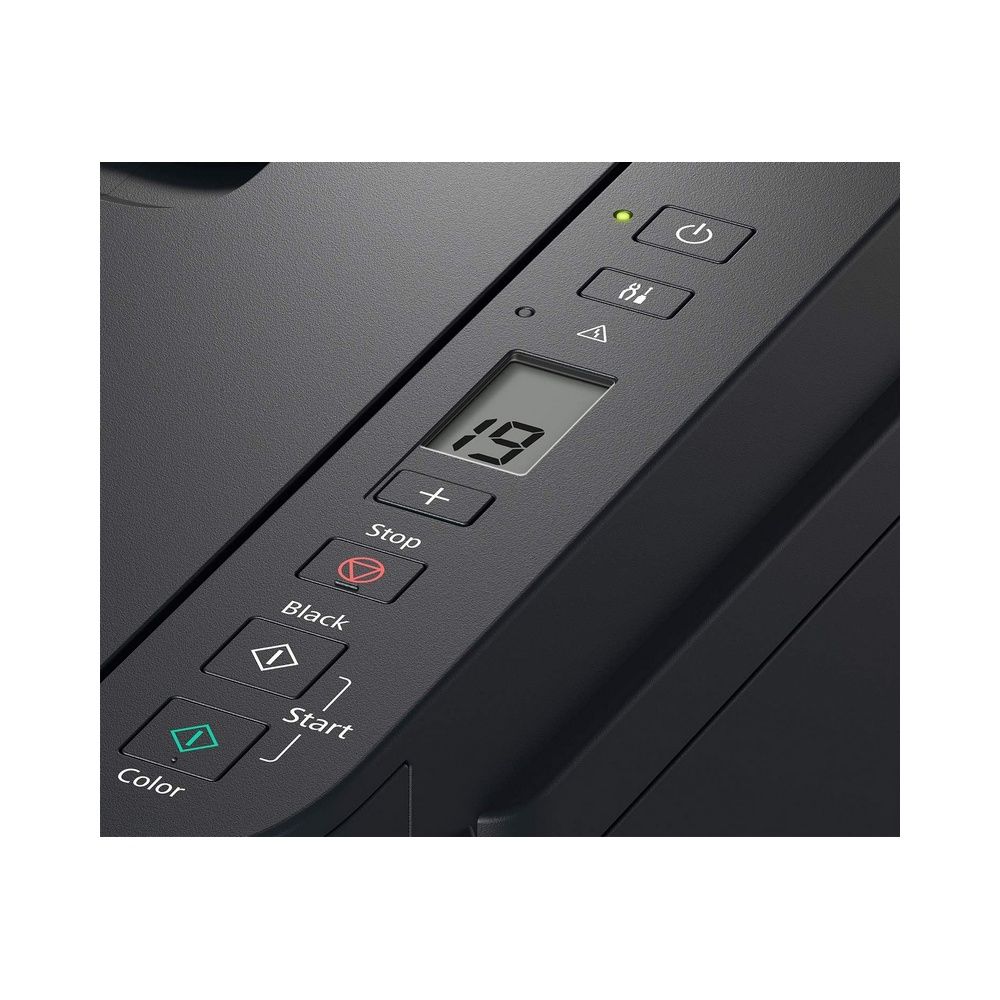
The printer features a 1.2-inch LCD segment monochrome display for straightforward operation. Multiple copies and scans can be performed directly from the printer.
Technical Specifications
| Specification | Details |
|---|---|
| Model | Canon PIXMA G2010 |
| Product Type | Ink Tank All-in-One Printer |
| Functions | Print / Scan / Copy |
| Ink System | Integrated Ink Tank |
| Ink Type | GI-790 |
| Black Ink | Pigment Black |
| Colour Ink | Dye-based Cyan / Magenta / Yellow |
| Maximum Print Resolution | 4,800 × 1,200 dpi |
| Print Speed Mono | Up to 8.8 ipm |
| Print Speed Colour | Up to 5 ipm |
| 4 × 6" Borderless Photo | Approx. 60 seconds |
| Scanner Type | Flatbed / Platen |
| Scanner Technology | Contact Image Sensor (CIS) |
| Optical Scan Resolution | 600 × 1,200 dpi |
| Maximum Scan Size | A4 / Letter, 216 × 297 mm |
| Copy Speed Colour | 32 sec / 1.7 ipm |
| Maximum Copies | 20 pages |
| Interface | USB 2.0 |
| Display | 1.2" LCD Segment Mono |
| Recommended Monthly Print Volume | 150–1,500 pages |
| Operating Temperature | 5–35°C |
| Operating Humidity | 10–90% RH |
| Power Supply | AC 100–240V, 50/60Hz |
| Dimensions | 445 × 330 × 163 mm |
| Weight | 6.3 kg |
| Quiet Mode | Available |
Print Specifications
The Canon PIXMA G2010 uses 1,472 total nozzles and supports the following print head and ink configuration:
Print Heads:
- BH-7 Black
- CH-7 Colour
Ink Bottles:
- GI-790 PGBK Pigment Black
- GI-790 C Dye Cyan
- GI-790 M Dye Magenta
- GI-790 Y Dye Yellow
Scanner Specifications
The integrated flatbed scanner uses CIS technology with an optical resolution of 600 × 1,200 dpi.
Scan Bit Depth
Greyscale:
- Input: 16-bit
- Output: 8-bit
Colour:
- Input: 48-bit
- Output: 24-bit RGB
The maximum document size is 216 × 297 mm (A4/Letter).
Copy Specifications
The PIXMA G2010 supports up to 20 copies per operation.
For colour document copying, the specified copy performance is approximately:
32 seconds / 1.7 ipm
Maximum document size is A4 / Letter.
Paper Handling
The rear tray supports a variety of paper types and sizes.
Supported Media
- Plain Paper
- High Resolution Paper HR-101N
- Photo Paper Plus Glossy II PP-201 / PP-208
- Photo Paper Plus Semi-Gloss SG-201
- Matte Photo Paper MP-101
- Envelopes
Supported Paper Sizes
- A4
- A5
- B5
- Letter
- Legal
- COM10 Envelope
- DL Envelope
- 4 × 6"
- 5 × 7"
- 8 × 10"
- Square 127 × 127 mm
- Business Card
- Custom sizes
Custom paper size range:
Width: 55–215.9 mm
Length: 89–676 mm
F4 printing is possible through custom size settings.
Rear Tray Capacity
| Media | Capacity |
|---|---|
| Plain Paper | Up to 100 sheets |
| High Resolution Paper HR-101N | Up to 80 sheets |
| Photo Paper Plus Glossy II 4 × 6" | Up to 20 sheets |
| Photo Paper Plus Semi-Gloss 4 × 6" | Up to 10 sheets |
| Matte Photo Paper 4 × 6" | Up to 20 sheets |
| COM10 / DL Envelope | Up to 10 sheets |
Operating System Compatibility
The Canon PIXMA G2010 supports:
- Windows 10
- Windows 8.1
- Windows 7 SP1
macOS is not supported according to the supplied Canon specifications.
Connectivity
The PIXMA G2010 uses:
USB 2.0
The supplied specifications do not list built-in Wi-Fi or Ethernet connectivity for this model.
Power & Environmental Specifications
Power Requirements
AC 100–240V, 50/60Hz
Power Consumption
- Off: 0.2W
- Standby: 0.6W
- Operation: 9W
Operating Environment
Temperature: 5–35°C
Humidity: 10–90% RH, without condensation
Recommended Environment
Temperature: 15–30°C
Humidity: 10–80% RH, without condensation
Storage Environment
Temperature: 0–40°C
Humidity: 5–95% RH, without condensation
Page Yield
Canon's specified page yields for plain paper are:
| Ink Bottle | Yield |
|---|---|
| GI-790 PGBK Black | Up to 6,000 pages |
| GI-790 Cyan | Up to 7,000 pages |
| GI-790 Magenta | Up to 7,000 pages |
| GI-790 Yellow | Up to 7,000 pages |
For 4 × 6-inch photo printing on PP-201:
- GI-790 Cyan/Magenta/Yellow: Up to 2,000 sheets
- GI-790 PGBK: Not applicable under the specified test condition
Actual yields vary according to print content, settings, environmental conditions and frequency of use.
Recommended Monthly Printing
Canon recommends a monthly print volume of approximately:
150–1,500 pages
This makes the PIXMA G2010 suitable for users requiring regular document and colour printing without the complexity of a larger office printer.
Ideal For
- Home users
- Students
- Small offices
- Home offices
- Schools and educational institutions
- Small businesses
- High-volume document printing
- Colour document printing
- Photo printing
- Scanning and copying
- Low running cost printing
Canon PIXMA G2010 – High-Volume Ink Tank Printing
The Canon PIXMA G2010 combines an integrated refillable ink tank system with print, scan and copy functionality. With up to 4,800 × 1,200 dpi print resolution, 8.8/5 ipm mono/colour printing, high-yield GI-790 ink bottles and borderless printing support up to A4, it is designed for users who need economical and versatile everyday printing.
Why Buy from Mustafa Computers?
Mustafa Computers offers genuine and original products sourced through trusted and authorized channels, backed by competitive pricing and professional pre-sales and after-sales assistance. With years of experience in technology retail and solutions, we provide reliable customer service and applicable manufacturer warranty support for a dependable purchasing experience.
Share


Shipping Policy
Shipping Policy
Free Delivery within Lahore: Available on orders above PKR 10,000 (selected items only).
Other Cities: Free delivery on orders above PKR 15,000. Standard courier charges apply otherwise.
Delivery Time: 3–5 business days (subject to courier and destination).
Couriers: We use TCS and Postex. Bulky items may be shipped via city-to-city cargo, with self-collection for cheaper delivery.
COD Orders
- Available on selected items only, up to PKR 19,000.
- 4% government tax applies on COD payments.
- Orders PKR 19,001–100,000 require 50% advance.
- Orders above PKR 100,000 require full advance or in-store pickup.
- Full advance may be required for certain items below PKR 19,000.
Return Policy Warranty
- 7 Days Return Warranty for defective or incorrect items.
- Products must be in original packaging with all accessories and documentation.
- No return for “change of mind”, software, or consumables (e.g., cartridges, toners).
Warranty Claim
- Warranty coverage is as per manufacturer or Mustafa Computers’ terms.
- Company may repair, replace, or issue a credit note for valid claims.
- No warranty for electrical damage, cartridges, or printer heads.
- Warranty void if item is physically damaged or packaging/accessories are missing.
- Check warranty applies to used items only.
- For international warranty, customer bears freight charges.
Customers must ensure they receive the warranty card and invoice at purchase. (Some items are valid by invoice only.)